MyRacePass - Official MRP App
- 4.8
- Rating
- 100.00K
- Installs
- Free
- Price

 Analysis by App-foxy
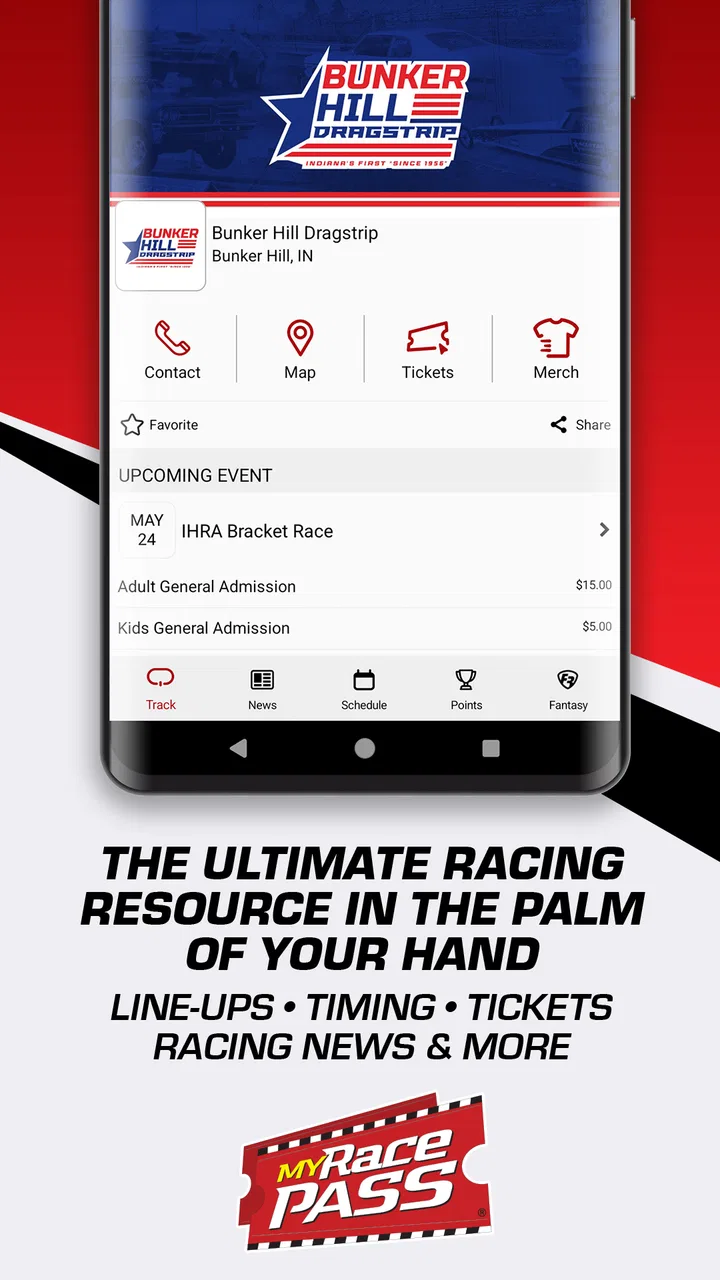
Following racing can be surprisingly difficult when information is scattered between a track’s social pages, separate timing screens, ticket services, and result posts. MyRacePass tries to bring that race-day information into one sports app, covering event details, lineups, results, live timing, points, tickets, news, and fantasy features. I found its value is less about flashy presentation and more about reducing the number of places I need to check when a race weekend gets busy.
Developed by MyRacePass, the app is free to install and aimed at everyone, which makes it approachable for casual spectators as well as people who follow a series closely. It has built a strong audience on Android, with more than 100,000 installs and an average rating of 4.8 from roughly 5,800 ratings. Those figures suggest that it is especially useful to people already connected to racing events, although the experience depends heavily on whether the particular track or series is actively using the platform.
Where MyRacePass helps most on a race weekend
The first thing I noticed is that the app makes more sense when I treat it as a race-weekend companion rather than a general sports-news reader. Before an event, I can use it to look for the event listing, check available information, and see whether tickets or schedule details are available. During the event, the focus shifts to lineups, timing, and results. Afterward, points and news become more useful than the live screens.
You May Also Like

 Blood Strike: 2.5 Anniversary
Blood Strike’s Loadouts Turn Every Drop Into a Tactical Gamble
A close look at Blood Strike’s custom loadouts: how fast access to signature weapons reshapes its battle royale rhythm, rewards preparation, and narrows the gap between fights.

 Pandora - Music & Podcasts
Pandora’s Music Is Easy to Start, but Harder to Recover
Pandora’s strength is its low-effort path from a seed to a station. Its weak spot is how much confidence it asks you to place in connection, setup, and quiet recovery.

 8 Ball Pool
8 Ball Pool Is Built on Rivalries, Rematches, and Routine
A close look at the rivalries, rematches, shared routines, and unanswered safety questions that turn a quick pool match into a persistent mobile community.

 Samsung Music
Samsung Music’s Quiet Strength Is Playing What You Already Own
Its reach comes less from spectacle than from dependable access to a personal library. That simplicity is both the app’s strongest retention engine and its ceiling.

 AccuWeather: Weather Radar
AccuWeather Review: A Quick, Clear Forecast for Everyday Decisions
For everyday plans, the best forecast is the one you can understand quickly. AccuWeather makes rain timing, radar, and local conditions easy to act on, with a few trade-offs.

 Hill Climb Racing
Why Hill Climb Racing Still Turns Crashes Into One More Run
A tiny car, a bumpy hill and one more upgrade: Hill Climb Racing keeps resurfacing because its simple chaos makes every near-miss feel personal.
More From Our News Desk



That changing role is important. Someone opening it without a specific event in mind may find the amount of racing information less immediately clear than a simple league app. The strongest workflow starts with a track, series, or event I already care about. Once I have that context, the app feels much more purposeful.
A realistic example is a Saturday evening when I am heading to a local race with friends. Rather than searching the web for the track’s schedule, then switching to another page for lineups and a third source for results, I can check the event in MyRacePass before leaving. At the venue, live timing can help me follow progress when I cannot see every part of the track. Later, results and points give me a way to understand what happened beyond the final race I watched.
The app is also useful for people who follow several events but do not want to memorize every series’ website. Its racing focus gives the information a shared home, while the event-based organization keeps the details connected to the right meeting. That is more convenient than relying on general search results, which may surface an old announcement or an unofficial page.
Still, I would not assume that every event offers the same depth. The app can present different kinds of information depending on what an organizer or series publishes through the platform. If one event has detailed timing while another mainly shows basic event information, that is not necessarily a fault in the app itself. It is one of the first distinctions a new user should understand.
Why first-time users can get stuck
The most common friction is knowing where to begin. A racing fan may expect the app to open directly on a favorite driver or championship, but the useful path often starts with finding the relevant event. If I search too broadly, I can end up looking through similarly named tracks, classes, or meetings. Taking a moment to identify the exact venue and date makes the rest of the experience much smoother.
Another point of confusion is the difference between scheduled information and live information. A lineup may be available before cars take to the track, while live timing only becomes meaningful once the event is underway. If a screen appears empty or incomplete before the relevant session, I would first check the event stage and schedule rather than assuming the app is broken.
Results can also require patience after a race. A user who expects an instant final classification may see information develop as officials complete the event. In practical terms, I use the app to follow the flow of a meeting, but I avoid treating every early display as the final word. That is particularly important when a race has multiple sessions, changing lineups, or results that need to be posted after the action ends.
The fantasy area creates a different kind of learning curve. It is not essential for checking a lineup or following timing, so I would not start there if my immediate goal is simply to know when a race begins. It makes more sense as an optional layer for fans who enjoy making predictions or engaging with the competitive side of a series. Keeping that feature separate from the core event workflow prevents it from becoming a distraction.
Checks I make before relying on the app
Before leaving for a track, I check the event page while I still have a stable connection. I look for the correct venue, confirm that I am viewing the intended meeting, and review whichever schedule or ticket information is available. This simple habit avoids the most frustrating race-day mistake: arriving with an event page open but not knowing whether it is the right one.
I also open the relevant timing or results area ahead of time when possible. I do not expect live data to appear before the event is active, but checking the route in advance helps me recognize the correct screen later. This is one of the more useful habits with an event app: learn the path before the crowd, noise, and poor reception make every tap feel urgent.
Because the current Android version is 19.3.845 and the app requires Android 12 or newer, I would check the phone’s operating-system version before planning to use it on an older device. That requirement is easy to overlook when an app is free. A compatible phone is more important than installing it at the last minute, especially if the event is far from home and there is no convenient alternative.
The app is free to download, but it includes optional in-app purchases ranging from $5.99 to $54.99 per item. I would review any purchase prompt carefully and decide whether the feature is relevant to my use before continuing. A fan who only needs schedules, results, or timing may have no reason to spend money, while someone interested in optional premium elements may judge the cost differently.
It is also worth remembering that a strong connection is not the same as complete event coverage. If timing or results are missing, I check whether the event itself has begun and whether the selected page matches the right meeting. I then compare the information with the track’s official announcements if the decision matters, such as a major schedule change or a ticket question.
A dependable workflow when information looks incomplete
When a page does not look right, I recover in a fixed order instead of repeatedly tapping the same control. First, I return to the event selection and make sure I have not opened a similarly named meeting. Next, I check whether I am looking at a pre-event schedule, an active timing screen, or a completed-results view. These checks solve many problems that initially look like loading failures.
If the event is active but the display still seems stale, I move away from the page and open it again after confirming the phone has a working connection. I avoid making several purchases or changing settings while information is uncertain. For a live race, a short delay can be less damaging than acting on an unverified screen.
One practical advantage of separating the stages is that I can still use the app even when one part is not useful at that moment. If live timing is unavailable, I may still read the event information or return later for results. If the race is finished, there is little value in repeatedly refreshing a live view; the results and points sections are the more sensible destinations.
I use the same approach with tickets. I treat ticket information as event-specific rather than assuming that every track handles admission in the same way. If the ticket details do not answer a question, I look for the organizer’s own instructions instead of guessing from another event in the app. This is a small but important trade-off: centralization saves time, but it does not remove the need to read the event’s particular rules.
For regular followers, a useful routine is to separate three visits: one before the event for planning, one during the event for timing and lineups, and one afterward for results, points, and news. Trying to use every feature at once makes the app feel busier than it needs to be. Using it according to the race’s stage makes the information easier to interpret.
When the problem is outside the app
Racing information is unusually dependent on live conditions. A delayed session, a change at the venue, a weak mobile connection, or an organizer that has not published an update can all look like an app failure. I therefore avoid judging the platform from one missing number or one late result. The more useful question is whether the event itself is producing information that can be displayed.
This matters most with live timing. Timing is not just a static article; it depends on an active feed and the event’s own operation. If the screen is quiet during a pause, delay, or transition between sessions, that may be normal. I check the event schedule and any available news before concluding that the app has stopped working.
The same caution applies to points. Championship standings can depend on completed results and the way a series records them. If the points view has not changed immediately after a race, I give the event time to move from live action to official classification. For a quick conversation at the track, I may rely on the displayed result; for a season-long conclusion, I wait for the standings to reflect the completed event.
There is also a human factor. At a crowded track, many people may be using their phones at the same time, and the local network can become unreliable. I check important details before entering the busiest area and keep the app as a supplement to, not a replacement for, the venue’s announcements. That approach makes the app more useful without asking it to solve every communication problem at the circuit.
Compared with searching the open web, MyRacePass is better when the event is already represented inside its racing ecosystem. Compared with a track’s social feed, it is more structured for results, lineups, timing, and points. A general sports app may be better for someone who follows many different sports and only occasionally watches racing, while a single track’s own channel may be preferable when that venue publishes highly specific local updates there first.
Who should use it, and who may prefer another option
I would recommend it to fans who attend races, follow regional or series-based competition, or want a more organized way to check event information. It is particularly suitable for someone who regularly asks practical questions: When is the meeting? Who is in the lineup? What is happening right now? Where did the competitors finish? How has the points picture changed?
It is less compelling for a person who only wants broad racing headlines, video highlights, or a universal calendar covering every kind of motorsport. The app’s strength is its connection to specific racing events, not acting as a complete replacement for every source a racing fan might use. If my priority is watching video, I would look elsewhere; if my priority is event logistics and competition information, this is the more natural fit.
I would also hesitate to depend on it as the only source for a time-sensitive travel decision. I can use it to organize my visit and check the available event details, but I still verify major changes through the venue or organizer when the cost of being wrong is high. That is not a criticism unique to this app; race schedules and event operations can change faster than any single information channel.
For families, the Everyone age rating makes the app broadly approachable, but the amount of racing terminology and event detail may still be more useful to older children and adults who already understand the sport. For a newcomer, I would begin with the event listing and results rather than the deeper competitive features. That gives the person a clear introduction without overwhelming them with every available section.
My practical verdict after using it as a racing companion
MyRacePass succeeds when I use it for what it does best: connecting a particular race event with the information I need before, during, and after the meeting. The combination of lineups, timing, results, points, tickets, news, and fantasy gives the app more depth than a basic calendar, while the free entry point makes it easy to try without committing to a subscription.
The main limitation is that the experience is not equally predictable for every event. Users need to understand the difference between an event that has started and one that has not, allow for updates after the action, and recognize when a venue or organizer is the source of a delay. Once I accepted those boundaries, the app became much less frustrating and more useful.
My final advice is to install it before race day, confirm the correct event while online, and use each section at the stage where it makes sense. Do not judge live timing before the session begins, do not treat an early result as necessarily final, and do not assume ticket details work the same way everywhere. For fans who want one practical racing dashboard rather than a collection of scattered pages, this is a worthwhile free app; for casual viewers seeking general sports coverage, a broader alternative may fit better.
The developer is MyRacePass, the app was released on July 31, 2017, and its current version is 19.3.845 for Android 12 or newer. Those details matter mainly when preparing an older phone or deciding whether to install before traveling. In everyday use, its real advantage is simpler: it gives me a focused place to follow the event, recover when information changes, and return afterward to understand the result.
FAQs for MyRacePass - Official MRP App
01What is MyRacePass – Official MRP App used for?
MyRacePass is a motorsports companion app designed to help fans follow racing events, drivers, and tracks in one place. After exploring the app, its main functions include viewing race schedules, finding event information, checking results, following live updates when available, and browsing news or standings. It is particularly useful for dirt track, stock car, sprint car, and other racing series supporters who want event details on their phone.
02Can I use MyRacePass to follow live race results?
Yes, MyRacePass can provide live timing, scoring, race updates, and results for supported events, although availability depends on the track, series, and event organizer. Some races may offer detailed lap-by-lap information, while others may only display final results or basic updates. It is best to check the specific event listing before relying on the app for complete live coverage.
03Does MyRacePass include schedules and information for my local track?
The app covers a wide range of participating tracks and racing organizations, so you may be able to find your local venue by searching its name, location, or upcoming events. Track coverage is not universal, however, and information can vary from one organizer to another. Before downloading, users should search for their preferred track or series to confirm that it is supported.
04Is MyRacePass free to download and use?
MyRacePass is generally available as a free download, allowing users to browse many schedules, event listings, results, and racing updates without an upfront purchase. However, certain events, premium features, livestreams, or content supplied by individual organizers may involve additional charges or separate access requirements. Any applicable costs should be reviewed inside the app or on the event’s information page.
05Does MyRacePass work on both Android and iPhone?
MyRacePass is designed for mobile users and is available for supported Android and iOS devices through their respective official app stores. Performance can depend on your phone model, operating-system version, internet connection, and the quality of data supplied by the event organizer. Keeping the app updated is recommended, especially during busy race weekends when live information and notifications are being delivered.
Pros
- Quick access to race schedules
- results
- and event updates.
- Useful driver and team profiles for following favorite competitors.
- Push notifications help users stay informed during race weekends.
- Supports multiple racing series in one centralized app.
- Provides track and event details while traveling to races.
Cons
- Coverage and update speed can vary between racing series.
- Some features may depend on organizers submitting complete data.
- Frequent notifications may feel excessive during busy race weekends.
- Older event information can be harder to find after an event ends.
- The app may use extra battery when location or notifications are enabled.

MyRacePass - Official MRP App
Gallery